

With nearly 400 million active users, LinkedIn is the preferred source of job opportunities for talented candidates.
But if you’ve (like me!) spent countless hours scrolling through gross, irrelevant jobs to get to a single good prospect, you might have been attacking these job searches with less-than optimal search filters.
I’m here to break the silence (smash it against the table, in fact!) about what filters might be missing from your search so you can reduce your time on the hunt and maximize only the most valuable job prospects.
All sound good to you??? Let’s get started.
Filter to: Metropolitan Areas
Let’s face it: Northern Kentucky is “basically” Cincinnati. Southeast Michigan is “basically” Toledo, and Washington DC is “basically” Maryland – and every other neighboring state.
When you access a city’s entire metropolitan geography, you increase the total jobs available SO THAT you can hyper-target in better ways… maybe target better salaries, or a title jump??
If you’re walking or taking public transit to work, of course you’ll run into issues from a geographic perspective. But if you have a car and can drive the 30 minutes to a job with 20% better pay, less hours, and nicer benefits, why wouldn’t you?
In fact, the single best job prospect I ever pursued was fully remote (as in, the filter included “Worldwide”).
Why? Because I wasn’t limited by geography. I could target jobs in a completely different way, maximizing the things I valued over the headquarters’ proximity to me!
Is that the best practice for everyone? No, of course not! In fact, I’ve also seen a ton of value in living near your coworkers. You can go out for lunch or drinks after work, and you can form a corporate softball team!
The happy medium to work proximity and job value lies in the DMA regions. Don’t sleep on those filters!
Filter to: All Boxes EXCEPT “Internships”
Are you under 23 years of age? No? Then stop applying to internships!!! Accidentally or intentionally! I don’t care if you’re 45 years old and sleeping in your mom’s basement, you have something to offer this world. And it deserves a salary!
While most companies can differentiate between an unpaid internship (don’t even get me started on that nonsense) and a paid position, they tend to get lost in where exactly a normal salaried position lies on the corporate ladder.
As long as you filter away the internships, you shouldn’t have to sift through too much garbage to locate the job that’s right for your skill level.
Filter to: “Nonprofit Organizations” (if applicable)
Okay – shout out to you nonprofit heroes. As someone who got started in that world, I can say with confidence that nonprofit work is HARD. You wear a ton of hats, and you hold tightly to your values. I respect the heck out of that!
If you are pursuing a career track specifically in nonprofit, be sure to apply the advanced filter of “Industry” > “Nonprofit Organizations.”
That means you can use the Search functionality to describe your position (“fundraising,” “engagement,” “marketing,” etc.) and layer on a nonprofit target to pursue only jobs within the nonprofit workforce.
I’ve used this for TONS of LinkedIn refreshes, and it’s been a game changer in the job hunt!
Filter to: “Previous Week”
This is easily the most important filter I’ve implemented in my own job hunt.
While jobs remain “open” for several weeks after their launch, the jobs almost always re-up inside LinkedIn weekly if they haven’t yet filled the position. Then, you inevitably get stuck in job hunt “purgatory” and you never hear back from the recruiter after applying.
For example, check out this lovely note from Stitch Fix turning me down last Friday (9/3/2022) for a position to which I applied in May (05/2022)!
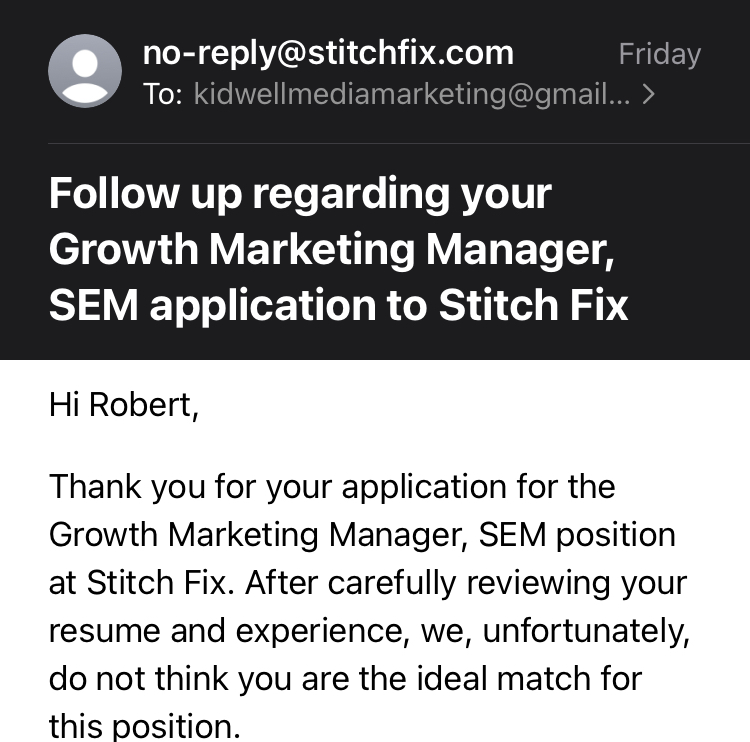
…a TEXTBOOK example of exactly why I should’ve used this one-week lookback filter and will save you the shock (like my own) of being turned down 2 months after you’ve started a new position! These guys did NOT re-up weekly and I completely whiffed on reading the room here.
Every filter you add inside LinkedIn should intentionally qualify your target audience further. While these filters shape job prospects in all situations, your specific industry & expertise may require even further research.
Are you in academia? Your search may need to include “University” in the query. Are you in need of a specific salary? You can filter for salary as well (beware: you may be filtering out prospects who may meet your salary but choose to stay unlisted!).
Be honest with yourself about what your specific needs are in a new position. And don’t forget to send me a message when you land an interview– I want to celebrate with you.
And now, if you’re committed to using this info to improve your job search, I shall channel the great Ron Swanson, whose famous toast rings clearly in my mind: “To the Hunt.”
Resources:
https://nealschaffer.com/linkedin-statistics/
https://www.nytimes.com/2022/06/11/your-money/unpaid-internships.html
https://www.glassdoor.com/blog/top-5-reasons-hear-applying-job/


