

Advertising on Social Media can be confusing but cannot be ignored. Of the 5% of total revenue that should be spent on digital marketing, a realistic social advertising budget spends 20% toward social media marketing efforts.
If you’re admin of a Facebook Page, as many businessowners probably are, you’ve likely seen the “boost post” icon flashing its beautiful face out at you each time you scroll through previous posts. You’re likely ready to wine & dine this button and are excited to throw some extra cash from your booming business at Facebook Ads.
As a professional of PPC campaigns, I am sorry to say that for years, I truly believed that boosted posts were the only path to Facebook advertising. Luckily, it’s not the case, and I’d like to present some information about two very different paid advertising options, so that you can decide what’s best for your business.
The Facebook Boosted Posts Button was originally designed to enhance an existing post’s engagement rate by providing you with more impressions to a demographic of your choosing. This type of Facebook advertising happens on a small scale, is paid for by impression and simple to design.
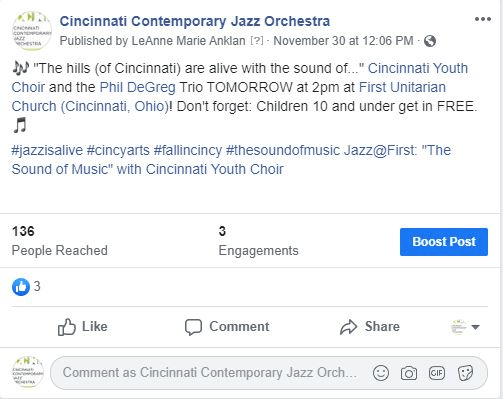
Facebook Ads, however, is an entirely different interface, unique to advertisers who use deeper targeting and reporting metrics. Facebook Ads allows you to create ads that target more heavily, create remarketing lists, pay per click, and advertise Instagram Ads simultaneously.
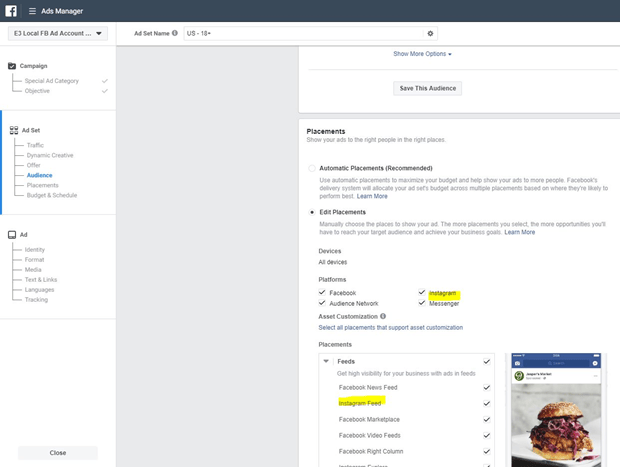
While the option to boost posts can be found at the lower part of each of your normal page posts, you’ll need to go to https://business.facebook.com/ to access this (weirdly, very hidden) part of Facebook. From there, you can set up your Business Account and begin running ads as a Facebook business.
You cannot operate Facebook Ads Manager without a Business Account, because you need to provide a credit card, the pages you manage, etc. Once those are in place, you’ll be able to access the full Facebook Ads platform.
To break down the creation of a new ad in a very simple way, I’ll leave it to these four steps:
- Create a campaign with a lifetime or daily budget
- Create ad sets with targeting features and special offers, if you have any. At the bottom of this section, you can also choose to pay per impression or link click, depending on the tactic chosen at the campaign level
- Create individual ads to use across that ad set. Here’s a good place to test ad copy & creatives. Here, you’ll also select the Facebook & Instagram (optional) page through which you wish to promote.
- Optimize by accessing these three levels individually and tweaking changes as necessary. Ads will begin showing as soon as they’re published, so quickly toggle the blue icon to pause that ad before spending money.
I can hear your next question shouting at me through the space-time continuum, so I’ll address it now: why would you ever want to use boosted posts on Facebook, if the Ads Manager does all the same functions and more?

Remember how I originally introduced boosted posts? I said it was originally designed to boost an existing post’s engagement rate, which is a stepping off point from an existing post. If you’re highly engaged with your followers, you can select a post from that week that performed extremely well, attach some money to it (because you know your target audience likes it), assign some demographic, and watch the engagement rate soar.
I would generally use boosted posts when I want to expand my followers through my Facebook page, or I found that a costless post I made performed something stupid and wanted a ton of people to see it. With Facebook Ads, I cannot post anything that isn’t supported financially, so a/b testing anything is going to require a budget.
Sometimes I do have that budget. If my client needs results quickly, I can take a portion of the budget and a/b test with a much higher sample size. While your organic posts on your page get only as big an audience as people who like your page, $10-$50 could likely achieve a similar pool of people (for most smaller businesses), and we could have similar results in a week.
Often, I’ll use Facebook Ads Manager for campaigns with higher budgets, where I have more opportunities for huge ROI. If I’m promoting a popular jazz orchestra through Facebook Ads, I can choose to pay per click, create a remarketing list with an allocated portion of budget, and a brand awareness campaign targeting specifically reach all in the same campaign.
Small businesses or beginners in marketing should start with boosted posts. There, you can get familiar with some audiences you’re able to target and get a feel for the kinds of results you can get for your budget.

For bigger companies in CPG, Automotive, etc. I’d absolutely recommend the Ads Manager. Big company campaign delays happen so frequently that it’s worth the investment in testing upfront to get your campaign off the ground.
These companies also tend to have pre-assigned decisions for all Facebook Ads options, so the investment in initial testing wouldn’t be necessary, only the normal variation testing through the life of the campaign.
I strongly believe that marketing efforts are never wasted on digital, but be sure to understand the intricacies of difficult platforms like Facebook before you dive in. Allocate budget properly, understand the positives and negatives, and let social media work its magic on your investment.
Resources:
https://www.webstrategiesinc.com/blog/how-to-set-a-realistic-social-advertising-budget
The Beginner’s Guide to Facebook Advertising
Facebook Boosted Posts: Expert Tips for Great Results [2024]
Instagram ads: Everything you need to know in 2026
https://www.postplanner.com/boost-facebook-engagement-infographic/
Beginner’s Guide to A/B Testing Facebook Ads


