

Optimization within Google Ads Search is the most difficult thing about the platform, and a skill only a handful of Google Ads managers manage to perfect across their decades of work.
Target incorrectly, and the whole campaign dies. Even worse, it can take weeks to get the underperforming campaign back to the way it once was.
In my , we’ve cracked the code to paying (literally) pennies on the dollar in less than a year with Google Ads by choosing when to optimize, rather than what to optimize. We’ll walk you through a year in the life of this panicky, terrifying journey. Maybe you’re already in it and we can at least get you out of the fetal position and back on track.
The list of optimizations in Google Ads is extensive, but here they are:
At the campaign level:
- Bid strategy
- Location
- Ad schedule/Dayparting
- Dynamic Ads
- Conversion sets
- Ad groups
At the ad group level:
- Ads & Extensions (a/b testing & optimization)
- Landing Pages
- Keywords
- Audiences
- Demographics
- Devices
When optimized appropriately and at the appropriate time, it’ll be very difficult to screw up a Google Ads campaign. It will also be very difficult to carry all the money you’ll make for yourself or your client, so I’ll recommend an affordable, durable wheelbarrow for convenience.
First things first: hands off.
The more you touch a campaign, the more it enters what the failures of the world call “learning mode,” (yep, been there, done that, got the look of shame.) so you’ll want to avoid too much tweaking or you’ll reset the Automated Learning back to null.
During The Launch: Google Ads Optimization
When you initially start a campaign, you’ll only need to attack three things: keywords, ads and landing pages. These affect a Google Ads quality score for any account, so we need to address it first.

You can find keywords a few different ways
- You could guess, if you have a really solid foundation of what your business is about and have the capacity to conceptualize that into keywords.
- You could google yourself or a competitor and find the “related search terms” at the bottom of the page. You could also go down a rabbit hole of products you offer and find ways people search for them.
- Finally, you could use a PPC tool like SpyFu or SEMrush to find keywords simply by typing in your URL. Regardless, you’ll only need about 15-20, and try to keep it to 2 or 3-word phrases at maximum.
Getting excited for the backlash on this, but in my opinion you should always start with manually bidding on broad match modified (UNLESS you’re looking for keywords from pure broad search terms). I’ve corrected more campaigns than I care to admit where self-proclaimed “Google Experts” have developed a list of pure broad keywords that serve little to no targeting purpose.
For reference, imagine you wanted to target just the DMA region of Cincinnati. Now imagine your vendor took that with a grain of salt and instead targeted a radius around the city of 100 miles.
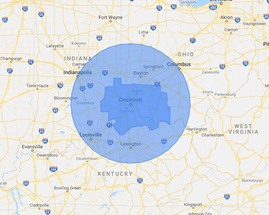
See all that extra space in there? That’s a general idea of fluff you’d get with pure broad match keywords. So bid LOW if you’re going to use them.
Ads are a little easier to attack. The best way I’ve found to approach ad copy is using Google Ads Editor, an Excel spreadsheet or both.
The key is to come up with 12 headlines and 4 descriptions for each ad group that you’re very happy with. That forms a single responsive search ad (if you choose to use it) and can be used to a/b test several headline/description combinations yourself.
Be straight and to the point with these ads; stick to facts. Your buyers are searching for your product, so they’re bottom-of-funnel already. Emotional marketing and brand awareness don’t play a huge role in the gladiator fight for the top-of-page impression share.
Finally, assign landing pages to your ads to make sure that your landing pages align with your ads which align to your keywords. Using multiple ad groups helps to solidify this differentiation.
Use similar language to your landing page. If you’re not happy with your landing page, you can just stick to mirroring the call-to-action.
Great! Your campaign is launched, and now you’re ready for the best part about Google Ads: driving down costs and driving up profits.
One Month Google Ads Optimization
During the first month, it can be tempting to over-optimize your account and put all your research to the test. Don’t do it! You’re much more likely to fishtail off course by adding in a ton of “optimization” when your data isn’t ready than you are to realign correctly this early on.

You’re only allowed to touch a few things. You should be getting much better with keywords and ad copy by now. You’ve got some great data with selecting optimal ads, and you should have great ideas on keywords from your newly stocked Search Terms Report.
As a rule, you should be optimizing these two things constantly, so you don’t need to save it for the end of the month.
After your first thirty days, try checking out device and time-of-day bidding.
These are great because you can make small adjustments based on what’s working well, rather than shutting off your entire campaign for a few hours or on a whole device. Those chaotic changes tend to have equally chaotic (and largely negative) results.
Your mobile device is simply going to have the most traffic. According to WordStream, 80% of people don’t leave home without their mobile device. Most people use their phones for searches, and it’s almost a sure thing to have mobile data like crazy in all industries. That said, are you making conversions at a low cost on mobile, or is another device doing better?
Additionally, see if your ads are worth showing overnight. If one of your KPIs are impressions & clicks, I’d recommend leaving this optimization alone. Nighttime impressions are still valuable, and the CPC is way lower. However, I find a much lower conversion rate between 11pm and 6am.
Three Month Google Ads Optimization
At the start of your fourth month (second trimester, your baby’s growing!), you get to work with some really fun metrics.
You’ve already made bid adjustments to your different hours of the day. By now, you have enough data to decide definitively if your ads are worth showing certain times. If you’re only showing conversions during certain parts of the day, shut it off for the awhile!
Leave it on for all days of the week, though. You don’t have enough data to know what might work better or worse in different seasons.
This nature of online marketing allows users to convert at almost any time, so you may be surprised by statistical results. Stick to the data and daypart your campaign accordingly.

Check out your landing pages. Have any ads had high CTR but low conversion rates? Maybe you’re taking them to the ski park homepage instead of the e-commerce page when they searched “yellow skis for sale.”
Usually, I only find landing page adjustments necessary when I’m dealing with heavily changing e-commerce pages, and even then, I’d be more likely to use Google Shopping Ads than SEM. Otherwise I’m pretty confident in my landing pages for the entirety of the first year.
Bid adjustments for audiences is now an option as well. Go to your Audiences page and add a few audiences set to “observation,” and keep an eye out for high-performing audiences. Adjust bids accordingly to capitalize on those valuable consumers.
Six Month Google Ads Optimization
After six months, you can get very granular data to fuel your choices. Try pausing some ad groups that just don’t perform well. Unless you’re specifically instructed to keep them on, you don’t need to spend your budget on products or services the online community isn’t interested in.
If you’re confident that the audiences you’ve bid up on have been working for you, you may try targeting those audiences as opposed to leaving them set to “observation.”
If you choose “targeting” over “observation,” please note that your volume will suffer enormously. I recommend having at least 10 trusted audiences before changing the setting from “observation” to “targeting.”
You may also be ready to start bidding up or down based on location. If you or your client is a franchise owner of a bar or restaurant for instance, they might benefit from funding high-performing stores a little better.
Your Big 10 college campus location during football season could probably use a higher marketing budget than the small-town store/gas station.

Year One Google Ads Optimization
One year later, and your boss is probably still upset you were a few dollars shy of a trillion and one dollars profit. At this point, you could sign off from that campaign and let it generate revenue for your company for the rest of your life.
Or you could launch it into the stratosphere with these last recommendations (I know that pumped you up).
You’ve created an ad schedule for times of day, but now you’ve had 52 weeks in which to observe weekly performance. If people aren’t converting over the weekend, you really don’t need to show your ads moving forward.
It’d be worth a check-in, just to pat yourself on the back for having still made the right choice, but rarely do you see year over year day-of-week optimization change that much.
Maybe pause a few of your demographics, too. A year later, and little old ladies aren’t buying your axe body spray? Check it off the list. 18-24-year-old men not into your menstruation relief pills? Same thing: let’s take it off the targeted list.
Finally, try a new bid strategy. I recommend running an experiment where you delete all but your best performing ad group. That way, you can gather a lot of data in a short time and see what works.
No more than 20% experimental funds, and only if your campaign has just found a new way to lift sales nicely. That way, you can be out in front of any issue your experiment causes.
Experiments should last about a month long. Any less, and your data won’t be useful enough for accurate results.
This template is a solid representation of some proven points of optimization within Google Ads. If you’re training to be a Google Ads manager, you’ll probably ignore most of this and learn things the long way!
But if you’re a client of mine, or even just a business owner in a time crunch, you’ll find clarity in a list like this.
Take it one step at a time, make tiny adjustments and you’ll conquer your Google Ads without breaking a sweat.
Resources:
https://www.searchenginejournal.com/underperforming-adwords-campaign/208332/
https://support.google.com/google-ads/answer/6263057?hl=en
Google Ads Quality Score: How To Raise It & Lower Your Costs
https://www.wordstream.com/blog/ws/2016/03/09/best-ppc-tools
https://www.wordstream.com/adwords-mobile
https://www.portent.com/blog/ppc/are-you-over-optimizing-your-adwords-account.htm
https://www.quicksprout.com/adwords-ab-testing/


